CISM Domain 3 - Cloud Computing MindMap
Download FREE Audio Files and Printable PDFs of our MindMaps
Your information will remain 100% private. Unsubscribe with 1 click.
Transcript
Introduction
Hey, I’m Nick from Destination Certification, and I’m here to help YOU pass the CISM exam.
In this video, we’re going to break down a full MindMap of some of the most important concepts in Cloud Computing from Domain 3— not just to help you memorize terms, but to really understand how they interconnect and why they matter.
This is the tenth of thirteen videos for domain 3. I have included links to the other MindMap videos in the description below. These MindMaps are one part of our complete CISM MasterClass.
Cloud Computing Characteristics
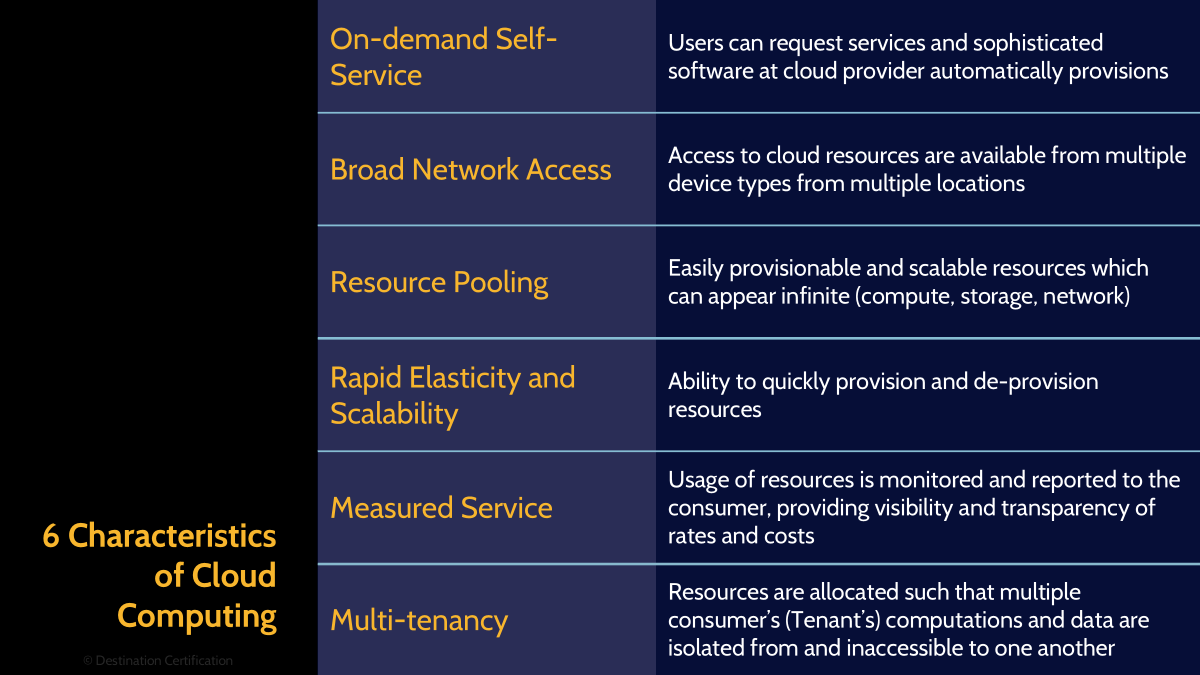
Cloud computing represents a fundamental shift in how organizations consume and manage IT resources. Why is that? To be more specific, why have so many businesses accepted this shift? Rather than purchasing and maintaining physical servers and infrastructure, businesses access computing power, storage, and applications over the internet on a pay-as-you-go basis.
To understand this shift, the National Institute of Standards and Technology (NIST for short) defines five essential characteristics that distinguish true cloud computing from traditional hosting services. These characteristics work together to create the unique value proposition of cloud services. It’s like knowing the ingredients of a real pizza — once you understand the essentials, you can tell the difference between authentic cloud and knockoffs, and judge how well a business can enjoy the full slice of benefits
On-demand self-service
The first characteristic is on-demand self-service.
Users provision computing resources automatically through web portals or APIs without requiring human interaction with service providers. This automation eliminates the traditional weeks-long procurement process for new servers or storage.
Broad network access
Moving on, the second characteristic is broad network access.
Cloud services remain accessible through standard network protocols from diverse client platforms including smartphones, tablets, laptops, and workstations. This universal accessibility enables workforce mobility and supports bring-your-own-device policies.
Resource pooling
The next characteristic is resource pooling.
Providers serve multiple customers using a multi-tenant model where physical and virtual resources dynamically assign and reassign based on demand. Customers generally have no control or knowledge over the exact location of resources, though they may specify location at a higher level such as country or data center. This pooling creates economies of scale that reduce costs while ensuring resources are available when needed.
Rapid elasticity and scalability
The fourth characteristic is rapid elasticity and scalability.
Resources scale up or down automatically to match demand, often appearing unlimited from the consumer's perspective. E-commerce sites handle Black Friday traffic spikes without manual intervention, while development teams scale down test environments overnight to reduce costs. This elasticity eliminates both over-provisioning waste and under-provisioning performance issues. Organizations pay only for resources actually consumed rather than maintaining excess capacity for peak periods that may occur infrequently.
Measured service
The fifth cloud characteristic is all about keeping score — systems automatically meter resources like storage, processing, bandwidth, or user accounts so everyone sees exactly what’s being used. This transparency not only keeps providers and customers honest, but also helps organizations track costs, charge departments fairly, and spot chances to cut waste.
Multi-tenancy
The second fifth cloud characteristic is…. Wait, second fifth… that’s not a thing, is it? Didn’t we say that NIST recognizes five cloud characteristics? To clarify and be a bit more serious, NIST does primarily recognize a five-characteristic framework, but multi-tenacity, while not being a part of this core five, is also a very important cloud computing characteristic recognized by many other frameworks.
So what does this honorary sixth characteristic look like in practice? Multi-tenancy means lots of customers share the same underlying hardware and apps, but each one gets their own walled-off space — like living in an apartment building where everyone has their own locked door, but the utilities are shared. This setup squeezes maximum value from resources and lowers costs compared to giving everyone their own private mansion. Thanks to strong security controls, tenants don’t peek into each other’s apartments, and modern designs even let you decorate your unit to fit your needs without messing with the neighbors
Cloud Service Models
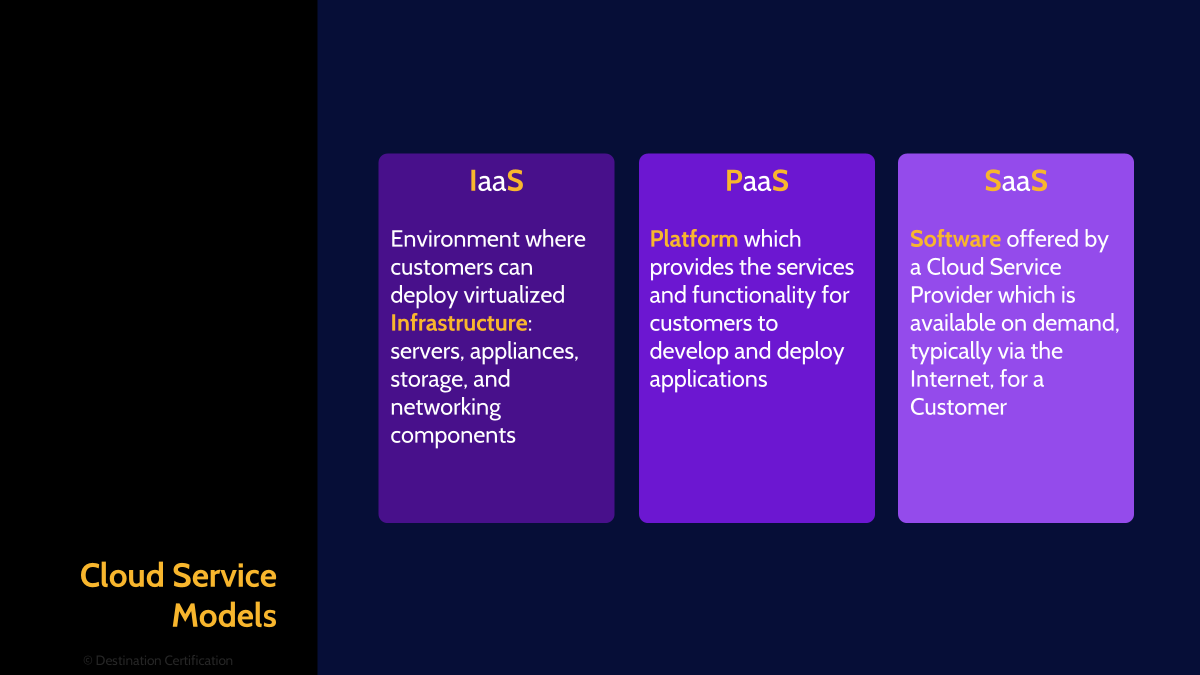
Now that we understand these basic Cloud Computing characteristics, we can move on to Cloud services.
Cloud services organize into three primary models that differ in the level of control, flexibility, and management responsibility. Each model serves different use cases and requires varying levels of technical expertise. Understanding these distinctions helps organizations select the appropriate model for their specific needs. The choice between models involves trade-offs between control and convenience, with higher-level services offering more built-in functionality but less customization flexibility. The first model we will discuss is Infrastructure as a Service.
IaaS
Infrastructure as a Service provides virtualized computing resources including servers, storage, and networking. Customers manage operating systems, applications, and data while the provider maintains the physical infrastructure. Organizations migrating legacy applications often choose IaaS for maximum control and compatibility. Examples include Amazon EC2, Microsoft Azure Virtual Machines, and Google Compute Engine. IaaS offers the flexibility to run any software stack while eliminating hardware management overhead.
PaaS
The second cloud service model id called Platform as a Service. It delivers a complete development and deployment environment in the cloud. In PaaS, developers just write code while the platform takes care of the messy stuff — infrastructure, middleware, OS, and runtimes. It’s like showing up to cook and finding the kitchen already stocked, prepped, and ready to scale from dinner for two to catering a wedding. PaaS particularly benefits organizations wanting to reduce development complexity and time-to-market.
SaaS
Finally, Software as a Service delivers complete applications accessible through web browsers or mobile apps. Users simply consume the software without managing any underlying infrastructure, platforms, or application code. Office 365, Salesforce, and Google Workspace exemplify this model where providers handle all technical aspects including updates, security, and availability.
Deployment Models
Now that we’ve wrapped up Service Models, let’s move on to Cloud deployment models.
Deployment models draw the lines — who owns the cloud, where it lives, and who gets in. Each one trades off control, security, and cost, and most organizations mix and match to get the right blend of safety and flexibility. Let’s begin to review these models – consider the following: What if IT worked like Netflix — pay a subscription, log in, and get instant access without buying all the gear? That’s the promise of the public cloud.
Public
Public clouds offer services over the internet to anyone willing to purchase them. Major providers like AWS, Azure, and Google Cloud operate massive data centers that serve millions of customers simultaneously. Public clouds excel for variable workloads, development environments, and consumer-facing applications where broad accessibility matters more than absolute control.
Private
Next off, private clouds dedicate infrastructure exclusively to a single organization. This model provides maximum control over security, compliance, and customization while maintaining cloud benefits like self-service and scalability. Private clouds are like having your own VIP lounge — pricier than the public option, but you control the guest list, décor, and security. Banks, hospitals, and other regulated industries love them for the mix of cloud perks with tight compliance and predictable performance.
Community
But what if you don’t want to foot the whole bill yourself? That’s where community clouds come in. They’re like a members-only co-op — organizations with the same goals or compliance needs pool resources to get a custom cloud that fits them all. Whether it’s government agencies sharing a FedRAMP setup or hospitals using HIPAA-ready infrastructure, this model spreads costs while still meeting strict standards
Hybrid
We’ve covered public, private, and community — but why settle for just one flavor when you can mix them? Hybrid clouds blend two or more deployment models, connected with tech that lets data and apps move around seamlessly. Organizations might run sensitive databases in private clouds while hosting web applications in public clouds. This approach allows workload placement based on security, performance, and cost requirements.

And that is an overview of Cloud Computing within Domain 3, covering the most critical concepts you need to know for the exam.
Something really cool we are providing with these MindMap videos is a completely FREE downloadable version of all the MindMaps in PDF format. We even include a blank version of each MindMap in case you want to print them out and take notes as you listen along. Link to download the MindMaps is in the description below.
If you found this video helpful you can hit the thumbs up button and if you want to be notified when we release additional videos in this MindMap series, then please subscribe and hit the bell icon to get notifications.
I will provide links to the other MindMap videos in the description below.
Thanks very much for watching! And all the best in your studies