
CISM Domain 3 - Information Security Control Design and Selection MindMap
Download FREE Audio Files and Printable PDFs of our MindMaps
Your information will remain 100% private. Unsubscribe with 1 click.
Transcript
Introduction
Hey, I’m Nick from Destination Certification, and I’m here to help YOU pass the CISM exam.
In this video, we’re going to break down a full MindMap of some of the most important concepts in Information Security Control from Domain 3— not just to help you memorize terms, but to really understand how they interconnect and why they matter.
This is the fifth of thirteen videos for domain 3. I have included links to the other MindMap videos in the description below. These MindMaps are one part of our complete CISM MasterClass.
Control Types
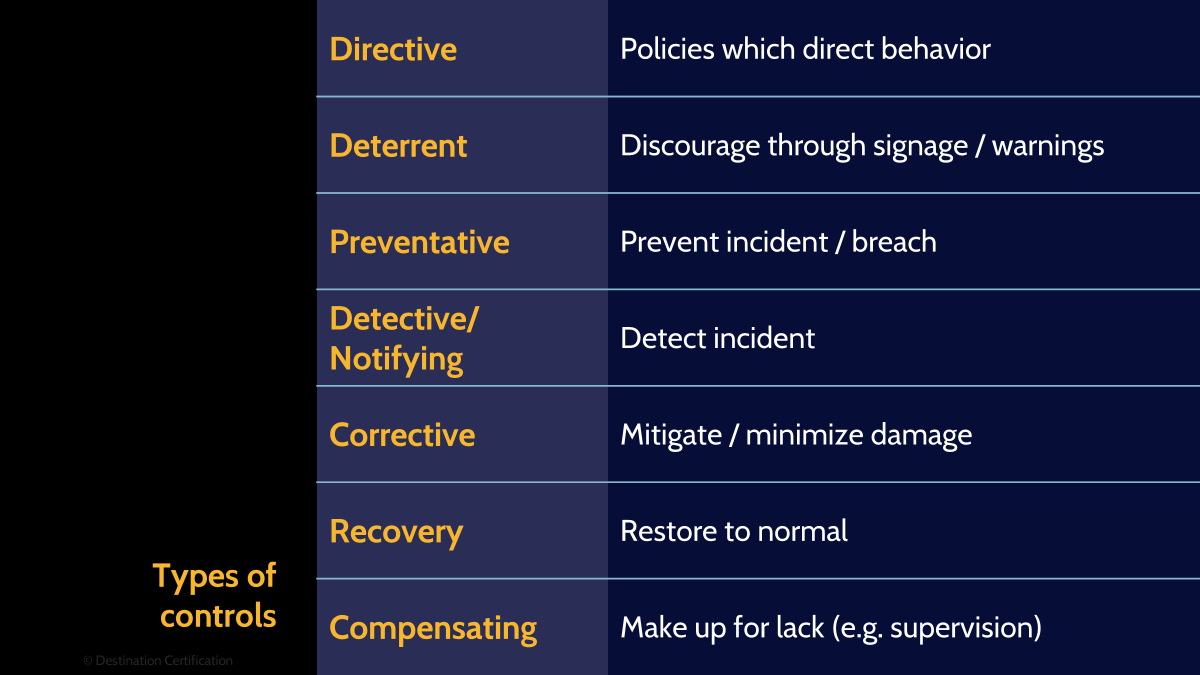
If you’ve been following our CISM MindMaps closely, we’ve been discussing Security Programs, frameworks and how to make sure these serve businesses meaningfully. You may be wondering: What’s the secret sauce behind every successful security program? Well, the foundation of any robust security program lies in thoughtfully designing and selecting controls that protect organizational assets. This process requires understanding not just what controls exist, but how they work together to create defense in depth
To do that, it helps to look at the distinct functions each type of control serves in a defense strategy. Think of control types as the different roles players have on a sports team - some prevent attacks, others detect when something goes wrong, and still others help you recover when incidents occur. The key is knowing when to deploy each type and recognizing that most security challenges require multiple control types working in concert. Let’s review some of the control types.
Directive
Starting with directive controls. These controls guide behavior through policies, procedures, and training programs that tell people what they should do. These are the guardrails for behavior — policies, training, and procedures that keep everyone on track. They may not tackle threats directly, but they teach people the moves and keep the game fair.
Deterrent
Next off, deterrent controls discourage potential attackers by making them think twice before attempting malicious actions. Security cameras, warning banners, and audit logs serve as psychological barriers - they don't physically prevent attacks but create uncertainty about consequences. The power of deterrent controls lies in their visibility; attackers who know they're being watched or that their actions will be traced are more likely to move on to easier targets.
Preventative
Another, more direct, type of control is preventive. Preventative controls actively block threats from succeeding, forming your first line of technical defense. Firewalls that drop malicious packets, access controls that deny unauthorized users, and encryption that renders data unreadable all prevent security incidents from occurring. These controls are your security workhorses - they operate continuously to stop attacks before damage occurs, though they require careful configuration to avoid blocking legitimate activities.
Detective
If preventive controls lock the doors, detective controls are the security cameras and motion sensors — ready to alert you the moment something goes wrong. Intrusion detection systems, log monitoring, and security audits reveal unauthorized activities that preventative controls missed. The value of detective controls becomes clear when you consider that most breaches go undetected for months - without these controls, attackers can operate freely within your environment, escalating privileges and exfiltrating data.
Corrective
Next up are corrective controls. Their job is cleanup: containing the mess and getting things running again. Antivirus software removing malware, patch management systems fixing vulnerabilities, and incident response procedures all work to correct security issues. These controls minimize the impact of successful attacks by quickly addressing the root cause and preventing further exploitation of the same weakness.
If corrective controls are the medics, recovery is the physical therapy — helping you regain strength and return to business as usual after the hit.
Recovery
Recovery controls restore normal operations after a security incident, ensuring business continuity when other controls have failed. Backup systems, disaster recovery plans, and business continuity procedures help organizations bounce back from attacks. The distinction between corrective and recovery controls is timing - corrective controls act immediately to fix problems, while recovery controls rebuild systems and processes to their pre-incident state, often requiring more time and resources.
Compensating
Lastly, compensating controls provide alternative protection when primary controls cannot be implemented or have failed, offering creative solutions to security gaps. Think of compensating controls as the duct tape of security — not the first choice, but a clever fix that holds things together when the main solution isn’t available.
When you can't patch a legacy system, you might isolate it on a separate network segment. When encryption isn't feasible, you might implement strict access controls and monitoring. These controls demonstrate security's flexibility - there's usually more than one way to mitigate a risk, and compensating controls help you maintain security when ideal solutions aren't available.
Now that we’ve wrapped up the main control types, let’s move on to control methods.
Control Methods

Beyond their functional purpose, controls are implemented through different methods that leverage people, processes, and technology. This classification helps you understand how controls are deployed and maintained in practice. A comprehensive security program requires all three methods working together - technology alone won't protect you if people don't follow procedures, and the best policies mean nothing without technical enforcement mechanisms. Let’s discuss these:
Managerial / Administrative
Managerial controls operate through policies, procedures, and governance structures that define how security is managed organizationally. Risk assessments, security policies, personnel screening, and security awareness training programs shape the human element of security. These controls establish the framework within which technical and physical controls operate, providing the strategic direction and operational procedures that ensure consistent security practices across the organization.
Technical/Logical
Next, technical controls use technology to enforce security policies automatically, providing consistent and scalable protection across digital assets. Access control systems, encryption algorithms, firewalls, and intrusion detection systems operate without constant human intervention. These controls excel at handling high volumes of security decisions quickly and consistently, though they require proper configuration and maintenance to remain effective against evolving threats.
Physical
Finally, physical controls protect the tangible assets and infrastructure that support your information systems, creating barriers in the real world. Locks, guards, cameras, and environmental controls prevent unauthorized physical access and protect against environmental threats. Even in our digital age, physical security remains crucial - the most sophisticated encryption becomes useless if an attacker can simply walk out with your server or install a hardware keylogger on executive workstations.
Overall Categorization
Think of controls like security nets — some cover the whole circus, while others are just under the trapeze. Categorizing by scope shows how wide each net stretches. This perspective helps security architects design layered defenses that protect at multiple levels - from enterprise-wide policies down to specific system configurations. Understanding these categories ensures you don't leave gaps by focusing too heavily on one level while neglecting others. The overall categorization includes general and system-level controls – let’s start with general controls.
General
General controls apply broadly across the entire organization or major portions of it, establishing baseline security for all systems and users. Enterprise-wide password policies, security awareness training programs, and physical security for data centers protect multiple systems simultaneously. These controls provide economies of scale and ensure consistent security practices, though they may not address specific risks unique to individual systems or applications.
System-level
On the other hand, system-level controls target specific applications, databases, or platforms, providing tailored protection for unique risks and requirements. Database encryption for sensitive customer data, application-specific access controls, and specialized monitoring for critical systems address risks that general controls might miss. These controls allow you to apply stronger protection where it's most needed without imposing unnecessary restrictions on less sensitive systems.
Safeguards vs Countermeasures
It is also important to understand the distinction between safeguards and countermeasures as it reflects different approaches to risk management - proactive protection versus reactive response. Safeguards are implemented before threats materialize, reducing vulnerabilities and protecting assets continuously. Countermeasures respond to specific, identified threats, often deployed when intelligence indicates an active risk. Modern security programs need both - safeguards provide baseline protection while countermeasures address emerging or targeted threats that require specialized responses.
Control Technology Categories
And because this is the first time you’re hearing the word control today, let’s discuss the main Control Technology Categories:
Controls can be further classified by how they integrate with existing systems and infrastructure, affecting implementation complexity and maintenance requirements. Categorizing controls is like planning a road trip: it tells you which car to take, how much gas you’ll need, and what the trip will cost. Native controls are the built-in features, supplemental ones are your aftermarket upgrades, and management support controls are the pit crew keeping the whole thing on the road.
Let’s take a better look at native controls.
Native
They are built into systems and applications from the ground up, providing security features that integrate seamlessly with core functionality. Operating system access controls, database audit capabilities, and application-level encryption leverage the platform's inherent capabilities. These controls typically offer better performance and reliability since they're designed as part of the system architecture, though they may lack the specialized features or flexibility of third-party solutions.
Supplemental
On the other hand, supplemental controls add security capabilities that systems lack natively, filling gaps with specialized third-party solutions. Endpoint detection and response tools, web application firewalls, and data loss prevention systems extend protection beyond what native controls provide. While these controls offer advanced features and can be deployed without modifying core systems, they require additional integration effort and may introduce compatibility challenges or performance overhead.
Management Support
Of course, even the best controls won’t run themselves. That’s why organizations rely on management support controls — the infrastructure that keeps everything administered, monitored, and maintained
Management support controls provide the infrastructure for administering, monitoring, and maintaining other security controls effectively. Security information and event management systems, vulnerability scanners, and configuration management tools help you operate your security program at scale. These controls don't directly protect assets but enable efficient security operations by automating tasks, providing visibility, and ensuring other controls function as intended throughout their lifecycle.
Information Security Control Testing and Evaluation
Once controls are selected, implemented, and supported, the focus shifts to proving their effectiveness. Continuous testing and evaluation uncover failures, misconfigurations, and evolving threats — keeping organizations safe from false confidence. That’s why we will be reviewing Information Security Control Testing and Evaluation.
This process involves assessing controls against multiple criteria, from technical effectiveness to business impact. Regular testing reveals control failures, configuration drift, and changing threat landscapes that require control adjustments. Without rigorous evaluation, organizations operate under false confidence, believing controls are protecting them when gaps may have developed over time.
Control Recommendations
Making sound control recommendations requires evaluating multiple factors beyond just security effectiveness. You must consider how controls will affect business operations, their cost-benefit ratio, and their alignment with organizational culture and capabilities. The best security control on paper becomes a liability if it's too complex to maintain or disrupts critical business processes. Your recommendations should balance security requirements with practical implementation considerations. Here are the main elements that all control recommendations should take into account, starting with operational impact.
Operational impact
Operational impact measures how controls affect day-to-day business activities and user productivity.
Effectiveness
Next, effectiveness evaluates whether controls actually reduce risk and achieve their intended security objectives.
Compatibility
Compatibility ensures controls work properly with existing systems, applications, and infrastructure components.
Safety
Safety considerations ensure controls don't create hazards for personnel or damage to equipment and facilities.
Reliability
Reliability measures whether controls perform consistently over time without frequent failures or false positives.
Compliant to laws and regulations
Finally, compliance verification ensures controls meet legal and regulatory requirements applicable to your industry and jurisdiction. Controls must satisfy specific mandates like GDPR for privacy or PCI DSS for payment card security.

And that is an overview of Information Security Control Design and Selection within Domain 3, covering the most critical concepts you need to know for the exam.
Something really cool we are providing with these MindMap videos is a completely FREE downloadable version of all the MindMaps in PDF format. We even include a blank version of each MindMap in case you want to print them out and take notes as you listen along. Link to download the MindMaps is in the description below.
If you found this video helpful you can hit the thumbs up button and if you want to be notified when we release additional videos in this MindMap series, then please subscribe and hit the bell icon to get notifications.
I will provide links to the other MindMap videos in the description below.
Thanks very much for watching! And all the best in your studies